Setup
This guide is mandatory to prepare your eprocurement suite to connect with Storefront API for Amazon. It is meant for Amazon Business account owners, not developers.
Prerequisites
- You will need to either create an Amazon Business account during this tutorial, or already have one setup.
- You will need to be an Amazon Business account administrator.
- You will need a URL to a wizard on your Storefront installation to connect your Amazon Business account. This step is independent of the Amazon Business setup and can be completed later.
Amazon Business account
As Storefront API for Amazon is executing requests on behalf of another Amazon Business account, we must ask you as the Amazon Business account owner to give us some information and grant access to your account to execute search requests on your behalf.
If you don't already have an Amazon Business account, create one for free. Choose the correct marketplace.
- Amazon Business USA
- Amazon Business Canada
- Amazon Business Japan
- Amazon Business Germany
- Amazon Business France
- Amazon Business Italy
- Amazon Business UK
- Amazon Business Spain
Create an account for the marketplace you're about to use. E.g. if you want to connect to Amazon Business France, be sure to create your account by signing up on Amazon France. You cannot use your US credentials for Amazon France.
We will require some information regarding your Amazon Business account. You can find this information on your Amazon Business account page (see the links above). Here's a typical Amazon Business account page.
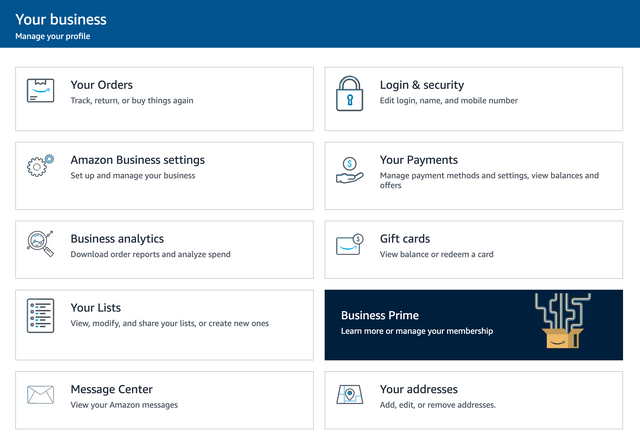
We will need to click on "Amazon Business settings":
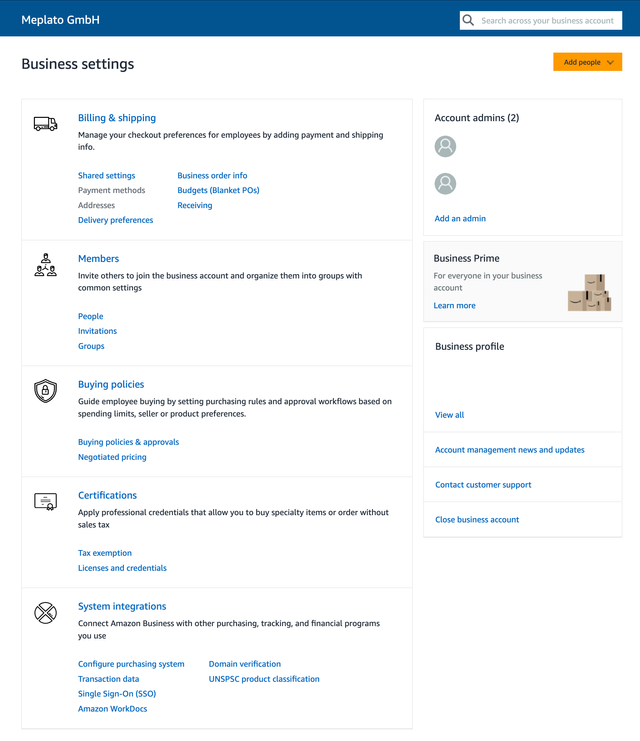
On the bottom of the page, you find "System integrations". In that box, click on "Purchasing system" (if already configured) or "Configure purchasing system". That will get us to the required page.
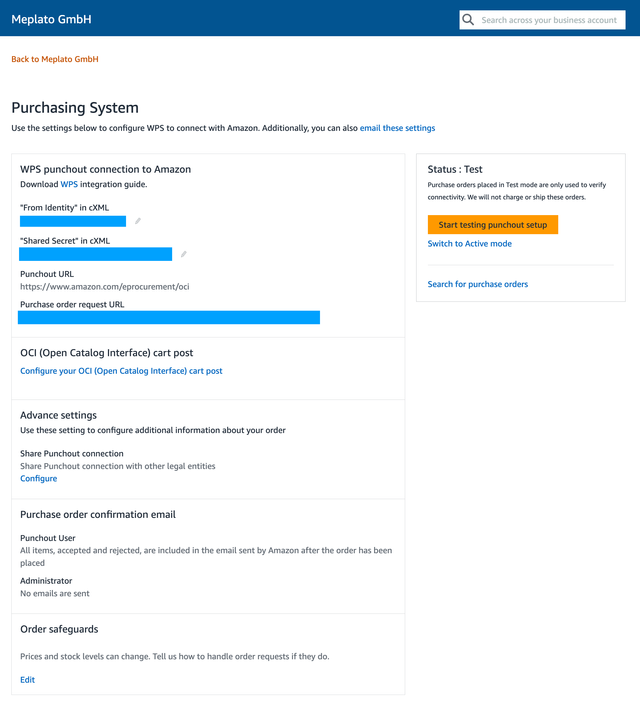
The information we need can be found in these three fields (the blue boxes in the screenshot above):
"From Identity" in cXML"Shared Secret" in cXMLPurchase order request URL
Authorization wizard
Now that we've gathered all information we need from your Amazon Business account, we can start to connect your Amazon Business account with Storefront. This is required for security reasons: You need to approve that Storefront may execute search requests against your Amazon Business account.
We have simplified this process with a wizard. If you apply for Storefront API for Amazon Business, our support will send you a link to that wizard that you need to complete with the information gathered in the previous section.
Here's a screenshot. The "Auth Code" is a random, opaque token, that is part of your setup procedure. Simply leave it as is, fill out the fields with the information above, and click "Next".
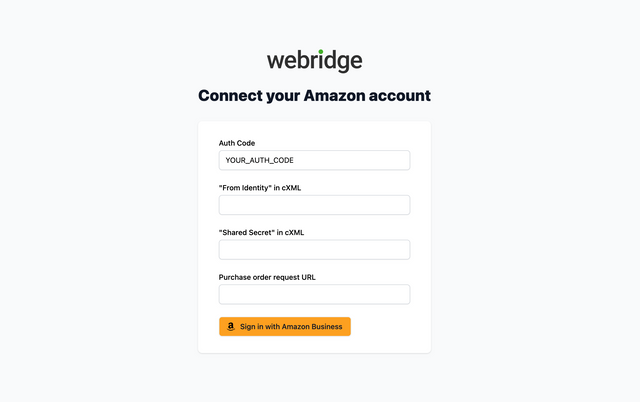
The authorization wizard will redirect you to Amazon where you need to consent to giving "Storefront" access to the related APIs on Amazon's side.
Only Amazon Business account administrators can give consent.
Once you've allowed access, Amazon will guide you back to Storefront to complete the authorization workflow. If everything's gone as expected, you will see a page like this.

Congratulations, you've completed the setup.